
Access your digital insurance slip (pink slip)
Take your digital proof of auto insurance wherever you go.
Web browser


Select Get your pink slip in the “Quick links” section of the home page, or select Documents from the main menu.

From your auto documents dashboard, select your most recent policy package or policy change document.
Although your digital insurance slip is valid proof of insurance in most provinces and states, we recommend that you always keep a paper copy with you.
Adding it to your mobile wallet
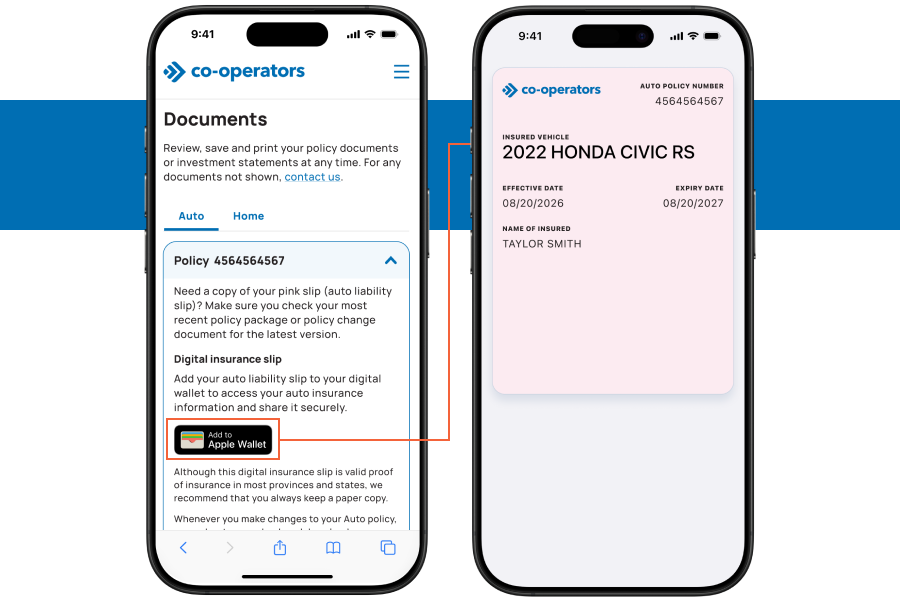
Mobile web browser
- Sign in to your Online Services.
- Select Get your pink slip in the “Quick links” section of the home page, or select Documents from the main menu.
- Under “Digital insurance slip”, select Add to Apple Wallet or Add to Google Wallet.
Remember to download a new pink slip whenever your policy is updated. We’ll email you before we renew your policy.
Reach out for support
Still have questions? We’re happy to help.
Call 1-855-446-2667
Monday to Friday, 9 a.m. to 5 p.m. ET